
Settlement
Conveyancing matters (sale and purchase) have a Settlement Ledger section in the matter workspace sidebar, under the Workspace group. (Don’t confuse it with the Settlement form stage above it — that’s the form fields; the ledger lives here.) This is where settlement figures come together: you enter the price and the amounts from the council, water and strata certificates, and Certum computes the adjustments and the balance due on settlement — live, as you type. No separate spreadsheet, no hand pro-rata.
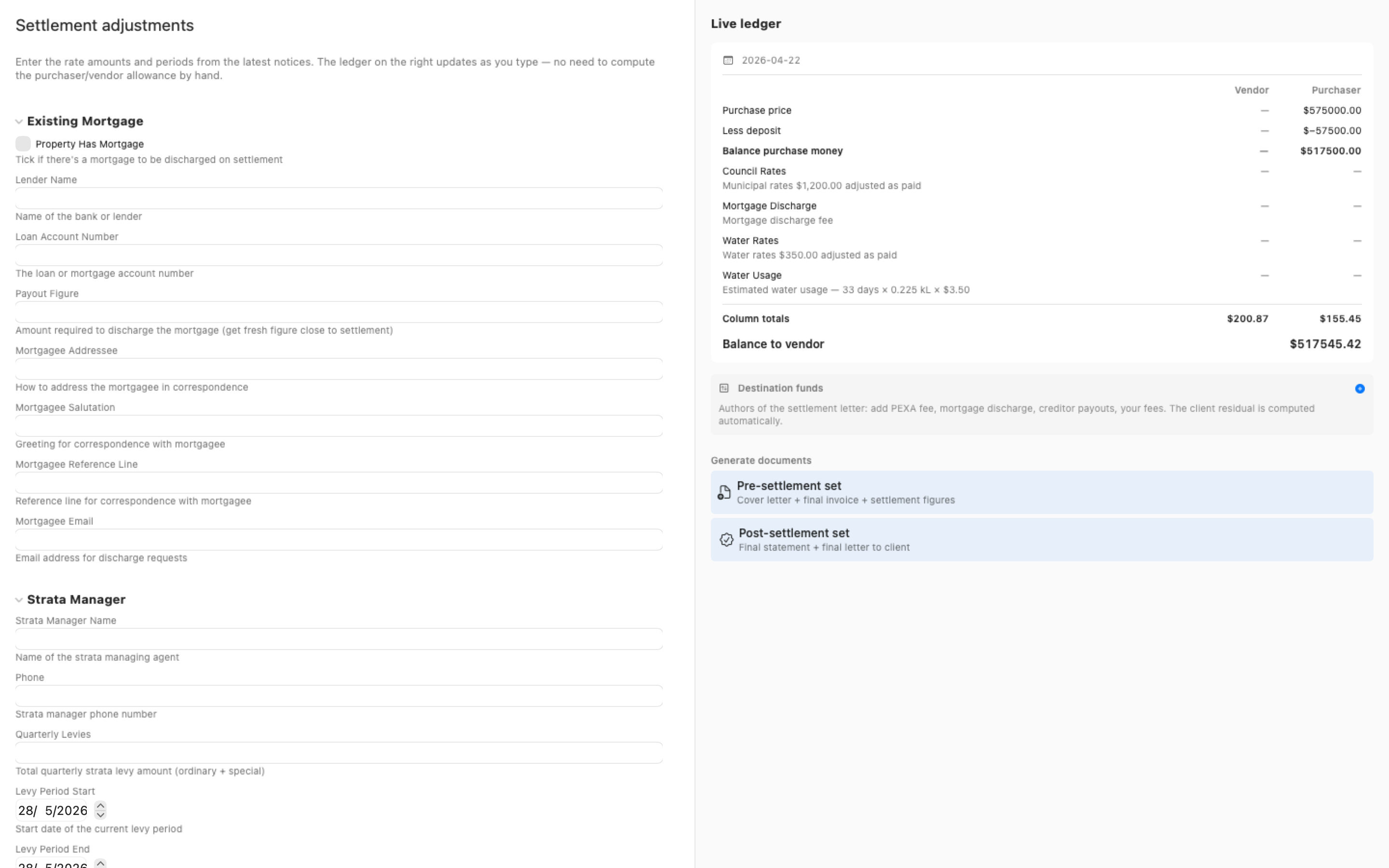
The layout is two panes: the figures you enter on the left, and the live ledger on the right showing exactly where the money lands.
Transaction basics
Section titled “Transaction basics”The Transaction Basics card at the top of the left pane holds the figures everything else hangs off:
- Sale price / Purchase price and Deposit
- Settlement date and Exchange date (the exchange date fixes the foreign-resident withholding rate and threshold)
- A “Contract makes land tax adjustable (cl 14.4.2)” switch — turn it on and the land-tax fields appear
Only the fields relevant to the matter show. Strata fields appear on strata matters; land tax appears only when the contract makes it adjustable.
Entering the adjustments
Section titled “Entering the adjustments”Below the basics are the adjustment blocks — council rates, water charges, and strata levies (administrative fund, sinking fund, special levies) where applicable. The fields are written to match the certificates you’re reading from: the s603 council rates certificate, the Sydney Water statement or s66 certificate, and the strata records.
Each adjustment has three parts:
- The amount — type the figure from the certificate. For council rates, enter the gross annual levy (including waste and stormwater charges, before any pensioner rebate).
- The period — the start and end dates the amount covers.
- A “paid?” selector — Paid, Unpaid — to be paid at settlement, or Not adjusted (agreed). This drives the direction of the adjustment: an unpaid charge is allowed to the purchaser for the vendor’s share of the period; a mixed strata levy (admin paid, sinking fund unpaid) nets the two directions correctly.
Two one-click fills save typing:
- Use rating year (1 Jul – 30 Jun) fills the council rating period from the settlement date.
- Use $x.xx seeds the current Sydney Water usage price from the built-in price table.
The live ledger
Section titled “The live ledger”The right pane is the ledger, and it recomputes as soon as an edit settles. Each adjustment shows as a plain-English line — what it is, the period, and which side it’s allowed to — in Vendor and Purchaser columns, with vendor disbursements (like a mortgage discharge fee) shown as vendor allowances rather than purchaser deductions.
At the bottom sits the balance due on settlement, formatted with thousands separators ($661,418.90, not $661418.90). Below that, disbursements and withholding, and default interest where it applies, are itemised so the headline figure can always be traced back to its parts.
If a computed figure needs to be different from what the certificates produce — an agreed amount, a correction — click the figure in the ledger to override it with a reason. Overridden figures are marked, and if the underlying details change afterwards, a drift marker flags the figure for a re-check.
Destination funds
Section titled “Destination funds”The Destination Funds card is for the settlement letter’s distribution: add rows for the PEXA fee, mortgage discharge payout, creditor payouts and your costs, and the client residual (the balance less the rows) is computed automatically. If the rows ever exceed the balance, the card warns you rather than producing a negative residual.
Generating settlement documents
Section titled “Generating settlement documents”Two buttons generate the standard document sets straight from the workspace:
- Pre-settlement set — cover letter, final invoice and settlement figures
- Post-settlement set — final statement and final letter to client
They render from the same figures the ledger shows.
Exporting an adjustment statement
Section titled “Exporting an adjustment statement”The Export adjustment statement menu produces a standalone NSW settlement statement in By/To adjustment format, written straight into the matter’s Working Documents folder and revealed in Finder like any generated document. Four outputs:
- Practitioner statement (PDF) — the working statement for the file and the other side
- Client letter (PDF) — the same figures explained for the client
- Detailed breakdown (PDF) — every line with its workings
- Line items (CSV) — the adjustment lines as a spreadsheet, for the accounting file
The PDFs are laid out on A4 pages in black ink whatever the Mac’s appearance, and the file name leads with the matter number (“000123 - Adjustment Statement - Practitioner statement.pdf”), as the audit summary does. The settlement figures are also named for VoiceOver, so the ledger reads aloud as figures rather than as “edit text”.
Related
Section titled “Related”- Generating Documents — the full document-generation flow
- Editing Matter Details — the matter workspace
- Reference Tools — the date calculator, useful for settlement date arithmetic