
Institution Notifications
Estate administration involves notifying institutions — banks, super funds, aged care providers, insurers — of a death, sending certified grant copies, and collecting assets. Certum Draft handles this with a built-in institution catalogue, per-institution lifecycle tracking, a contact log for every call and email, and follow-up tasks that chase themselves.
The Institution Catalogue
Section titled “The Institution Catalogue”Certum Draft ships with a catalogue of about 1,550 Australian institutions, each with:
- Estates department contact details (email, phone)
- Postal addresses for deceased estate correspondence
- Required documents lists
- Processing time estimates
- Brand logos for the larger institutions
The catalogue is curated: merged funds redirect to their successor (Active Super and Local Government Super both resolve to Vision Super), and a matter that holds a retired entry follows the redirect. Right-click an institution on a matter and choose Update details from catalogue to refresh its contact details from the current entry.
Adding Institutions to a Matter
Section titled “Adding Institutions to a Matter”- Open an estate matter and click Institutions in the sidebar
- Click the + button to open the institution picker
- Search by name, ABN, or address
- Filter by type using the chips at the top
- Click an institution to add it to the matter
- Enter the account/member/policy number
Reading the register
Section titled “Reading the register”Each row in the list carries the institution’s net value at death on its first line, its reference (or a count of accounts) and a phase pill on the second, and a next-action line only where it says more than the pill. Selecting an institution shows, top down: where it is up to (the phase card, with the grant answer and any response notes), its accounts and values, the contact log, and last the directory card — department, email, postal address and required documents from the catalogue.
Values at Death
Section titled “Values at Death”Each institution can carry what the holding was worth at the date of death — the running start of your inventory of property:
- Select an institution and enter its Value at death in dollars in the accounts card; an empty field stays empty rather than becoming $0.00
- Tick “Owed BY the estate (liability)” for debts rather than assets — an overdrawn account, a credit card balance, a loan
- An account’s label (“Everyday Account”) is kept when you edit it, whether the catalogue, document intake or the automation API gave it
These figures feed the Estate section’s distribution working (net estate, residue and per-beneficiary entitlements), so recording values here means the distribution letters compute themselves. The Estate tab carries the totals, including the real property; a holding closed as transferred outside the estate is left out of them.
The Lifecycle
Section titled “The Lifecycle”Each institution moves through six phases:
1. To Notify
Section titled “1. To Notify”The starting phase. The institution has been added to the matter but no notice has been sent yet.
Action: Click “Generate Notice of Death” to create a letter from the appropriate template. The letter is saved to the matter’s Working Documents folder.
2. Awaiting Response
Section titled “2. Awaiting Response”The Notice of Death has been sent. You are waiting for the institution to acknowledge and respond with their requirements.
Action: Click “Record Response” when the institution replies.
3. Awaiting Grant
Section titled “3. Awaiting Grant”The institution has responded and requires a Grant of Probate or Letters of Administration before releasing assets. The grant has not yet been issued.
Action: No action available until the grant is recorded on the matter (see “Recording the Grant” below).
4. Ready for Grant
Section titled “4. Ready for Grant”The Grant of Probate or Letters of Administration has been issued and recorded on the matter. A grant letter can now be generated.
Action: Click “Generate Grant Letter” to create a letter enclosing a certified copy of the grant.
5. Awaiting Funds
Section titled “5. Awaiting Funds”The grant letter has been sent. You are waiting for the institution to process and release assets.
Action: Click “Record Funds” when assets have been received.
6. Complete
Section titled “6. Complete”Assets have been received from this institution, or the file has been closed without funds (below). No further action required.
Which phases are chased
Section titled “Which phases are chased”Only Awaiting Response and Awaiting Funds are chased — the two phases where the institution owes us a reply. Awaiting Grant is waiting on the Court and Ready for Grant is our move, so neither ever reads as overdue on the dashboard, in the Today card or in the reminders. An institution that has gone quiet is marked as needing chasing after fourteen days without contact, unless a review date (below) says the institution asked for longer.
Closing a file without funds
Section titled “Closing a file without funds”Not every institution ends with money arriving. When one confirms that nothing was held, that the account was already closed, or that the holding passed outside the estate (a joint account by survivorship, a binding nomination paid direct), close it as such from any point after the notice: under More actions… in the phase card, choose Close without funds and the outcome — Nil holding, Account closed or Transferred outside the estate. The outcome and date show in the phase card and the timeline, the row stops being chased, and a holding transferred outside the estate leaves the estate figures and the distribution letters.
The contact log
Section titled “The contact log”Every institution has a Contact Log in its detail pane. The composer is one line — date, Channel (email, phone, post, portal, in person, other), Direction (sent or received), what happened, and an optional Review on date — and the timeline beneath merges what you log with the letter milestones (notice sent, response, grant letter, funds), which write themselves.
The log is what the chase clock reads. A contact we send resets the clock in the register, the Today card and the reminders; a contact we receive shows as “heard from” and leaves the clock alone, since hearing from them is not the same as them being finished. Logging never changes the phase — use Record Response and Record Funds for that. When an institution says how long it will take, the Review on date overrides the flat fourteen-day window until the next contact we send clears it.
If an estate has institutions in flight with no contact log and nothing recorded for 90 days or more, a quiet banner at the top of the list says how many and what to do with each: record the response if it came, log the contact you have had, or close it without funds. Nothing is reset for you.
Follow-up tasks
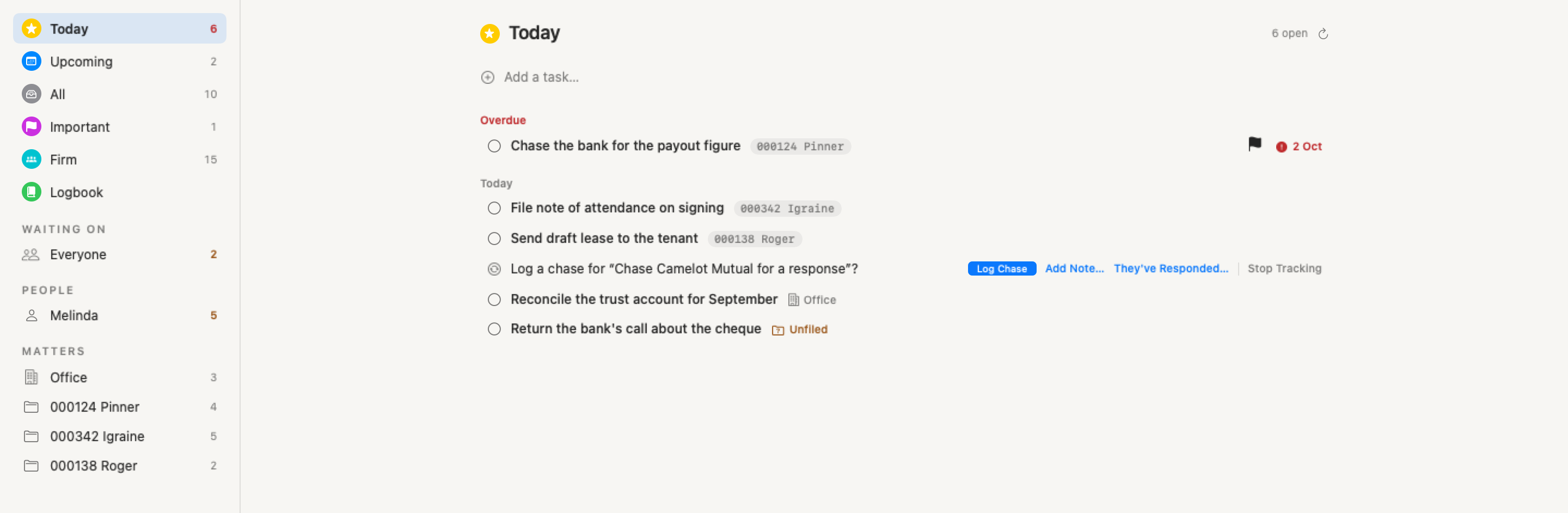
Section titled “Follow-up tasks”When a notice is marked sent, or an institution starts waiting for funds, the phase card offers once: Track follow-up · Mel · 24 Sep, with a menu to pick who, Track, and Not this time. Tracking creates a task in the firm’s Tasks database and then does the task administration itself: the due date is the chase clock’s projection and slides when you log a contact, mark a chaser sent or set a review date, and the task completes itself when the response is recorded, the funds arrive or the institution is closed without funds. A chip on the phase card shows who holds it and when it is due, opens the task, and carries Stop tracking, which also completes the task. Declining is remembered for that cycle; nothing re-prompts.
Ticking a tracked follow-up task means “I chased them”, not “finished”. In Certum the tick opens the chase choices rather than completing the task: on the Tasks page a strip offering Log Chase, Add Note…, They’ve Responded… (which brings you here to record it) and Stop Tracking, and on the dashboard or matter cards the task’s card with the same choices. Log Chase writes one entry to the institution’s contact log (“Chased — task ticked”), moves the chase clock and re-dates the task to the next chase; leaving the strip writes nothing. A tick made in Apple Reminders, through Siri or in Notion itself is logged as a chase directly. See Tasks. An institution with a tracked follow-up gets no separate chase reminder — the task’s own 9am reminder covers it. Follow-up tasks need Tasks set up on this Mac, an “I am” identity and the matter linked to Notion.
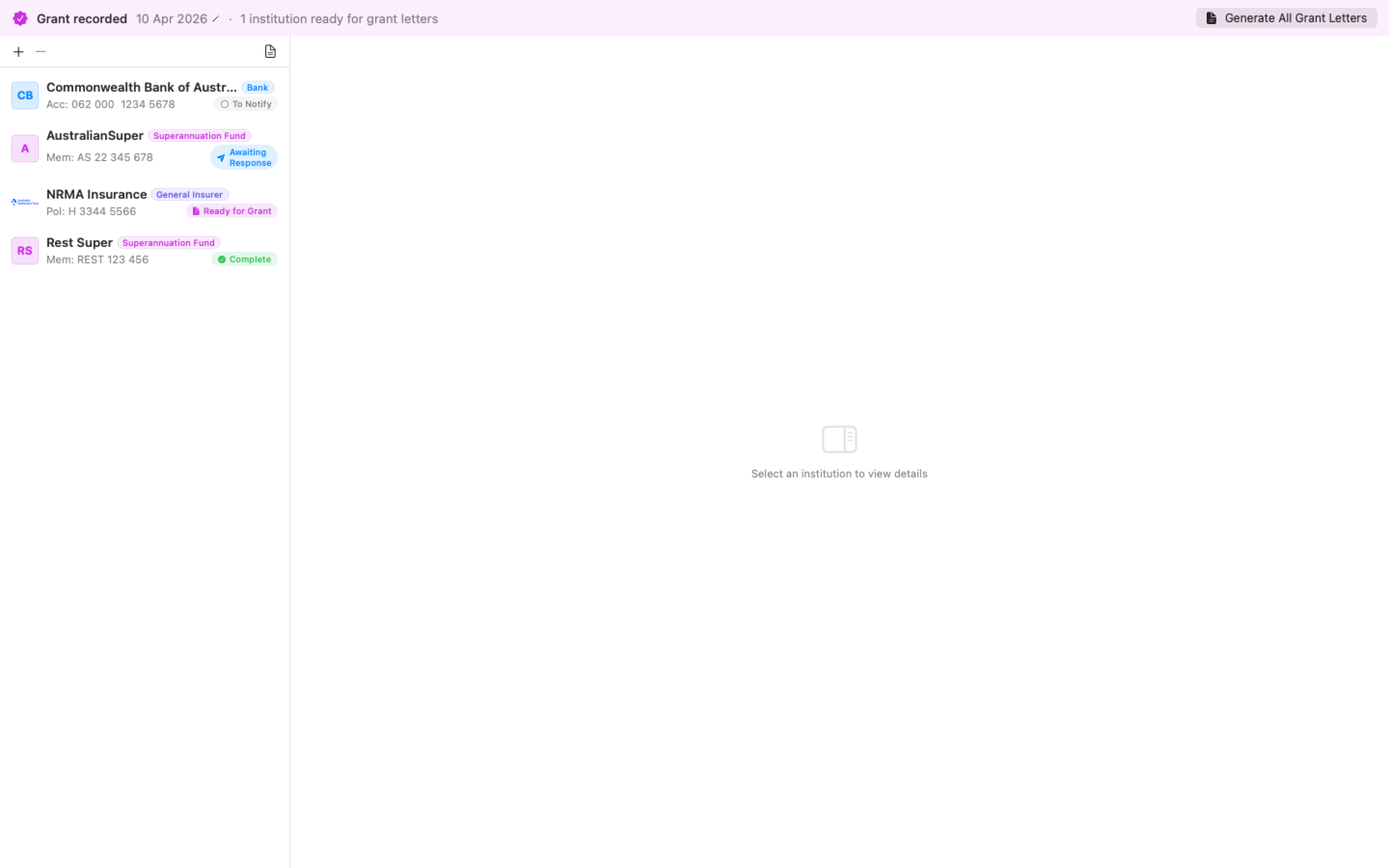
Recording the Grant
Section titled “Recording the Grant”Before the grant is recorded, the Institutions section shows a Record Grant Issued banner at the top. Click it to enter the date issued — the sheet pre-fills from a date already typed on the Details tab if there is one. The grant date is a single fact: recording it here also sets the matter’s probate date, so the calendar, the grant letters and this lifecycle can never disagree (clearing one clears the other). Setting the date on the Critical Dates card or the Details tab records the grant the same way, after a confirmation when the matter has institutions.
Saving the date releases every institution sitting in “Awaiting Grant” into “Ready for Grant” at once, and a follow-up banner offers to generate all the grant letters in one click.
Batch Operations
Section titled “Batch Operations”When a Grant of Probate or Letters of Administration is recorded on the matter:
- A banner appears showing how many institutions are ready for grant letters
- Click “Generate All Grant Letters” to batch-render letters for all ready institutions (with a confirmation first, so a stray click doesn’t produce a dozen files)
- Each letter is named with the institution (e.g., “Grant Letter - AustralianSuper.docx”)
The letters name the representative correctly. On a probate estate they say “executor” (or “executors” for two); on a Letters-of-Administration or intestate estate they switch to “proposed administrator(s)”. Names render in proper title case — O’Neill, McDonald and Smith-Jones keep their capitals.
Recording a Response
Section titled “Recording a Response”Click “Record Response” to capture details from the institution’s reply:
- Enter the response date
- Select whether Grant of Probate is required (Yes / No / Unsure)
- Add any requirements notes (what the institution needs to release assets)
- Click Save
If the institution does not require a grant, it moves directly to “Awaiting Funds” (or “Complete” if no further action is needed).
Dashboard
Section titled “Dashboard”The dashboard shows an Institution Notifications section when any estate matter has institutions in progress. It shows:
- One row per matter — client, institution count, and the age of the oldest outstanding contact (amber once it needs chasing)
- A “N need chasing” count in the header
- Expandable rows listing each institution’s current phase with colour coding
The rows read the same chase rule as the register: only Awaiting Response and Awaiting Funds count, a review-on date is honoured, and an institution with an open tracked follow-up task is stood down because the task carries it. The matter number in each row is a link — click it to open that matter directly on its Institutions pane.
Read-Only Matters
Section titled “Read-Only Matters”Institution tracking joins the matter’s read-only regime: while another Mac is editing the matter, adding or removing institutions, recording responses, ticking phases and editing values are all disabled — hovering explains “Another Mac is editing this matter”. You can still read everything; nothing you type can be silently lost.
Over the automation API
Section titled “Over the automation API”An AI assistant on the automation API can read the register (matter.institutions, with each institution’s contacts and chase date), append a contact entry (matter.institutions.log_contact) and stage asset holders for your review rather than registering them (matter.institutions.propose); a proposal appears in the matter’s review sheet with the holdings and a note on where the agent found it, and nothing is added until you accept it.