
File Notes
A file note should take seconds to make, not minutes. The File Note toolbar button in the matter workspace (also under the Matter menu as New File Note…, and in ⌘K) opens a sheet — pick the note type, describe it, type the note — and saves a PDF straight into the matter’s Correspondence folder. No choosing a folder, no naming a file, no leaving the matter.
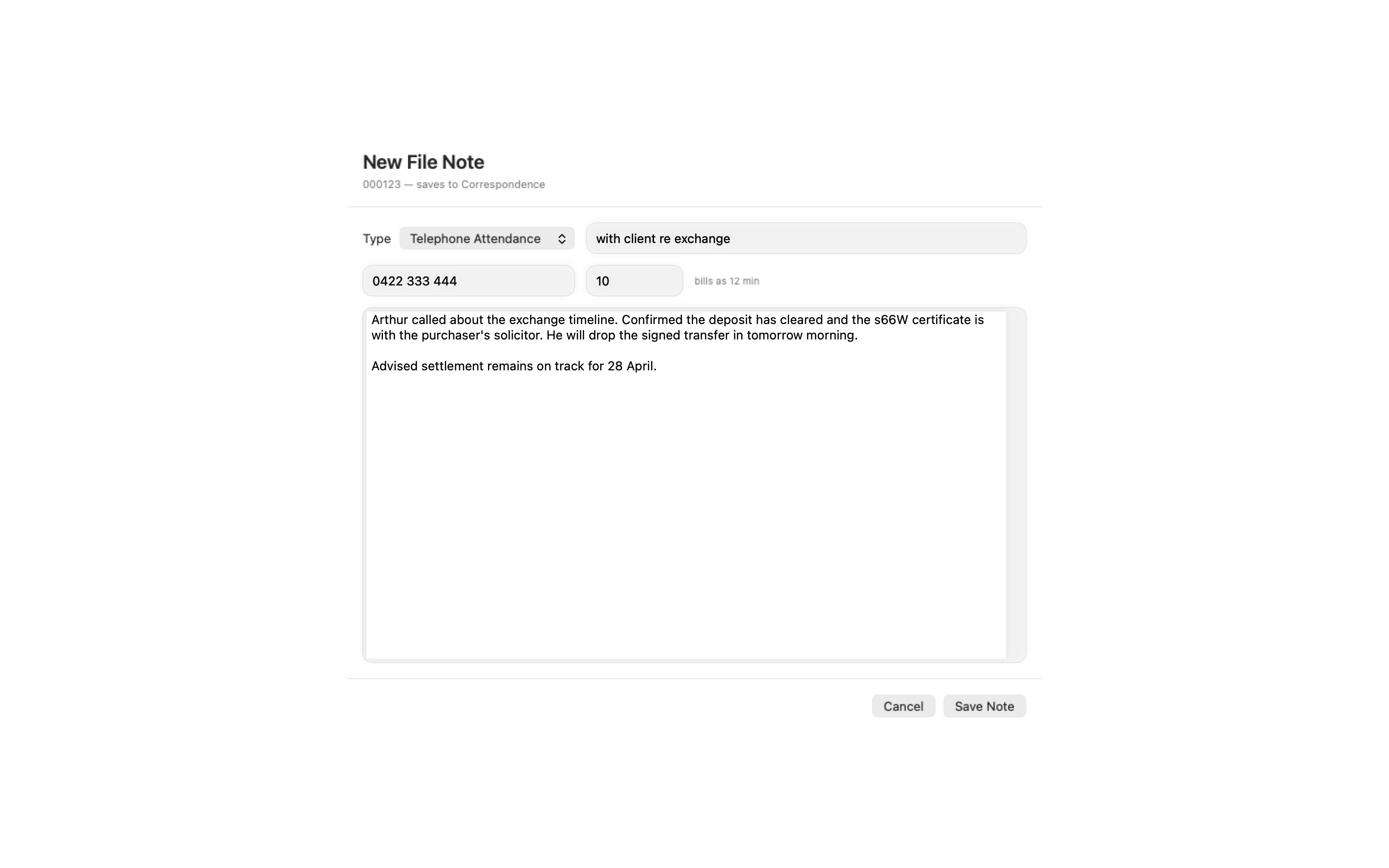
Making a note
Section titled “Making a note”-
Open the matter and click File Note in the toolbar.
-
Pick the note type: File Note, Telephone Attendance, Conference, Advice, Capacity or Settlement.
-
Add a short description — it becomes part of the filename, so “with client re contract” reads well in the folder later. The line under it shows the exact file the note will create, updating as you type.
-
Check the Date. It starts at now; change the day in the calendar popover and the time in the field beside it (scroll for minutes, ⇧-scroll for hours, ⌘-scroll for days), so a note typed up after lunch can be stamped with when the call actually happened. A reset button appears when the value drifts from now.
-
Enter a Duration in minutes on any note type, and the telephone number for an attendance. The sheet shows what it bills as — duration rounds up to the firm’s six-minute billing unit at capture (a 10-minute call bills as 12 minutes), the same rule the invoice expects.
-
Type the body. The editor is the one NoteDrop uses: bold (⌘ + B), italic (⌘ + I), bulleted lists (Return continues a list), a clock button that inserts the current time (⇧ + ⌘ + T — “2:47 pm — ”, for running attendance logs), dictation, and an Aa guide to the styles the PDF understands. Emphasis shows live and renders styled in the saved PDF.
-
Optionally give the note a Next step (below).
-
Press Save Note, or ⌘ + ↩ (Return is a newline inside the editor). Esc asks before discarding anything you have typed.
The PDF lands in the matter’s Correspondence folder (created if the matter type’s pack didn’t define one), named by the same convention throughout the app:
2026-08-10 01 Telephone Attendance - with client re contract.pdfThe date prefix keeps the folder chronological. The two-digit number is the day’s sequence, shared with NoteDrop: one more than the highest note already filed that day, whatever its type or description, and re-checked at save so a note another app filed in between bumps the number rather than being overwritten. The letterhead carries the firm name from Settings → General → Firm Name.
A next step
Section titled “A next step”Under the body, the optional Next step line turns the note’s outcome into a task: a title, who it is for (you, unless you choose someone else) and a due date from the usual presets or the calendar. When the note saves, the task is queued to the matter’s tasks exactly as ⌘ + ⇧ + T would queue it, so it shows as sending and survives a relaunch. Nothing is created if the title is blank or the note doesn’t save, and the next step is not written into the PDF. The line appears only on a Mac with Tasks set up and an “I am” identity, on a matter linked to Notion — see Tasks.
Why Correspondence matters
Section titled “Why Correspondence matters”Notes aren’t filed into a private notes store — they’re ordinary PDFs in the folder the rest of the app already watches:
- Invoice drafting sweeps Correspondence, so a telephone attendance with its billed minutes is sitting there when the bill is drawn.
- The automation API’s
matter.correspondencelisting sees them like any other letter.
If a colleague has the matter open, the workspace is read-only and the File Note button is hidden — notes are edits like any other.
Notes over the automation API
Section titled “Notes over the automation API”The same engine is exposed as the audited matter.note.add write operation, so an AI assistant (or any tool on the automation socket) can file a note — same types, same rounding, same PDF, same Correspondence folder. It accepts a duration on any type and a date to backdate the note to when the attendance happened. Every API note is recorded in the automation audit log.
Related
Section titled “Related”- Editing Matter Details — the workspace the File Note button lives in
- Invoices — where billed attendances end up
- Settings — the General pane’s Firm Name, printed on the letterhead