
Reference Tools
The Reference destination is Certum Draft’s toolbox: the lookups and calculators you reach for mid-matter, plus the editor for the firm’s invoice wording. Open it from the sidebar, or press ⌘ + 4.
A tool list sits on the left; the selected tool uses the rest of the window. The tools, top to bottom: Processing Times, News, Probate Costs, Intestacy Distribution, Date Calculator, Legacy Interest, Firm Details and Invoice Screeds. Whatever you type into a tool survives switching away and back.
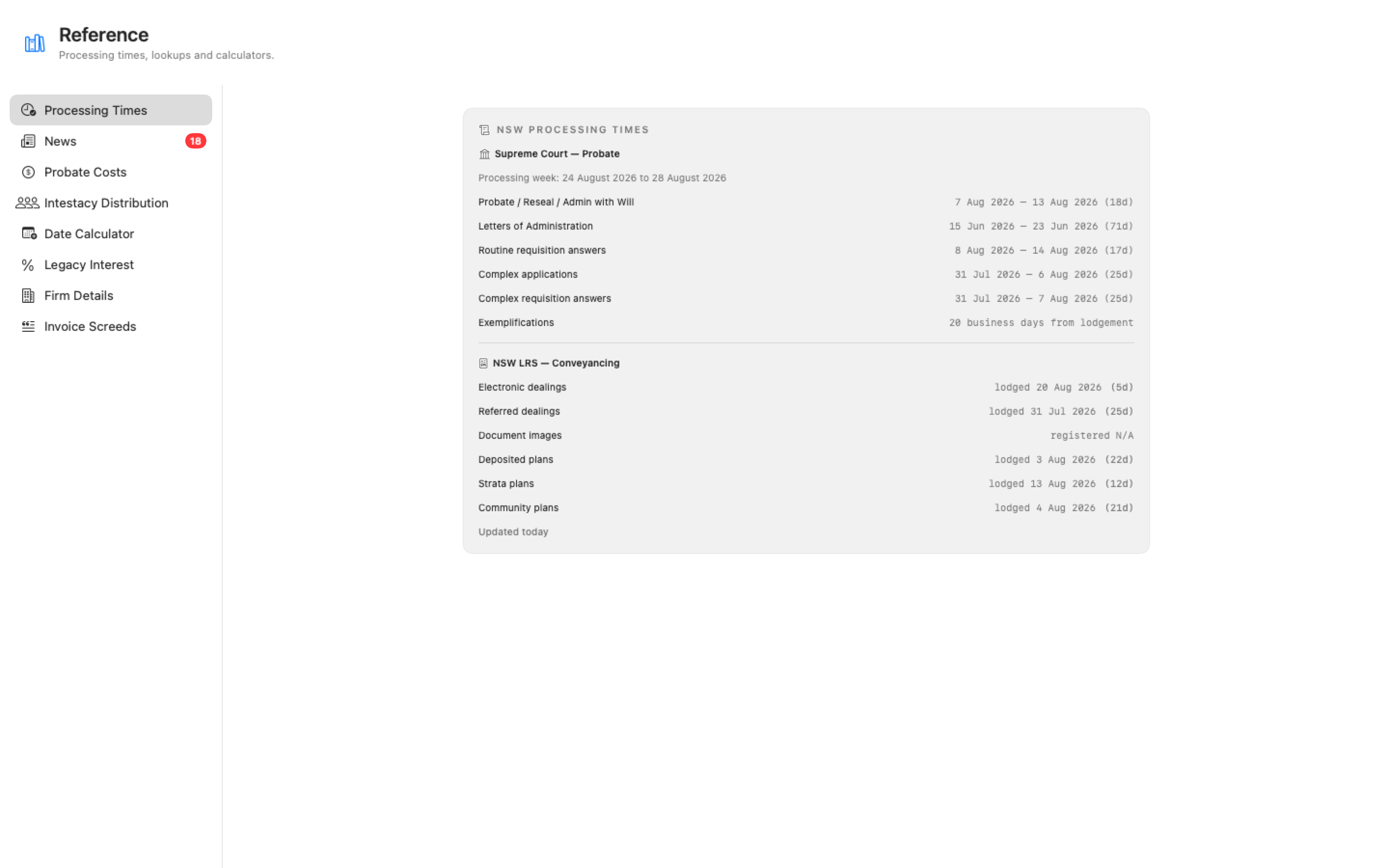
Processing Times
Section titled “Processing Times”How long the Supreme Court of NSW and NSW Land Registry Services are currently taking — probate and letters of administration on the Court side, electronic and paper dealings on the LRS side. The figures refresh in the background (roughly hourly) with a “last updated” timestamp, so what you see is never more than an hour old.
Clicking a block opens the official source page in your browser — the Supreme Court’s Wills and Probate page, or the LRS Current Registration Progress page — so you can cite the source when a client asks where the number came from.
A digest of Certum Draft releases, template pack changes and fee schedule updates. Template and fee changes arrive through Dropbox with no release of their own, so this is how the firm hears about them. Unread items put a count on the Reference row in the sidebar; opening the tool marks them seen.
Probate Costs
Section titled “Probate Costs”A quote for a probate application, computed live. Type the gross value of the estate and the tool shows:
- Professional fee on the Schedule 3 costs scale, with the schedule cited
- GST (10%) on the professional fee (untick Include GST for a GST-free quote)
- Filing fee — the Supreme Court filing fee, GST exempt, with the fee schedule cited
- Total, with a copy button for reading out to a client on the phone
Add a matter reference if you want one on the printout, then Export Quote PDF… to save a citable quote you can send or file.
Intestacy Distribution
Section titled “Intestacy Distribution”Who gets what when there’s no will. Build the survivor picture — spouse (including de facto), children and grandchildren per stirpes, then parents, siblings, grandparents, aunts and uncles as needed — with the date of death and the estate value, and each beneficiary’s entitlement under Chapter 4 of the Succession Act 2006 (NSW) computes live, statutory legacy included.
Export Distribution PDF… saves the distribution as a document you can put on the file or show the client.
Date Calculator
Section titled “Date Calculator”Two everyday date arithmetic tools:
- Add or subtract days — pick a start date, choose a common period (5, 14, 21 or 28 days) or type your own, flip the ± direction to count backwards, and choose Business days or Calendar days. The result can be copied with one click.
- Days between — the span between two dates.
Business-day counting knows the NSW public holidays. If you count past the end of the built-in holiday table, the result carries a caution rather than silently ignoring holidays.
Legacy Interest (s 84A)
Section titled “Legacy Interest (s 84A)”Interest on an unpaid legacy under s 84A of the Probate and Administration Act 1898 (NSW). Enter the legacy amount and the dates and the tool applies simple interest from the end of the executor’s year to the date of payment, at 2% above the RBA cash rate for the year interest begins (the rate table for 2020 onwards is built in, and the tool shows exactly which rate it applied and why).
The headline figure is the total including interest, with the interest component beneath it; both copy with one click. Where the will or a Court order fixes a different rate, there’s an override field. If interest started in a year outside the bundled table, the tool says so and asks for the rate rather than guessing. A short note at the bottom explains the statutory basis, so the screen itself can be pointed at when a beneficiary asks.
Firm Details
Section titled “Firm Details”A quick statistical glance at the practice: how many matters are on file, and the breakdown by matter type with percentages.
Invoice Screeds
Section titled “Invoice Screeds”The editor for the firm’s invoice wording — the “screeds” that seed every new bill on the Invoices tab. You don’t need to touch any files by hand: the editor changes are saved to the firm’s shared wording file, which lives beside your precedents in the templates folder (in Dropbox, so the whole firm shares one wording).
The left list holds an entry per matter type. For each entry you can edit:
- Match keywords — the words in a matter type’s name that select this entry (“estate”, “probate”, “sale of land”). Order matters: the first matching entry wins, so drag entries into order (or use the arrow buttons), and the editor warns you if an entry can never be reached because a broader one above it already catches everything.
- Fee narrative (lump sum) — the narrative description of the professional costs for a lump-sum bill.
- Itemised fee lines — the standard fee lines for an itemised bill.
- Standard disbursements — the seeded disbursement lines, each with its own GST toggle (statutory fees GST-free, sundries at 10%).
Below the entries, a read-only “Firm details on every bill” section shows what goes on every invoice — the firm header block, the trust and office accounts, the client-rights notice and the due-days figure — with a Show Wording File in Finder button when you need to see the file itself.
Once saved, the new wording reaches every open matter: untouched invoice drafts re-seed with it, while drafts someone has typed in are left alone. You can also open this editor straight from a matter’s Invoices tab via Edit firm wording….